Huss Valley beginner guide: your first match
Check the game, learn one action at a time, and use your first match to understand the controls before chasing an advanced build.
Preparation guide · gameplay not tested
Start with the right experience
This guide covers Huss Valley associated with the Huss Valley Official community. Its Roblox place ID is 107535308163741. Search results also contain similarly named experiences, so compare the destination of a play link before using a guide or a reward code.
Open the linked Roblox page and read the description and current in-game instructions. Those are the first places to check when an older article describes a button or feature you cannot find. A familiar title or thumbnail alone does not establish that two pages cover the same game.
Understand the reported match loop
Pro Game Guides describes a match with a Chaser and Runners. In that guide, Runners try to cross the arena three times, while the Chaser tries to catch them. Caught players can join the Chasers in later rounds. Use this as a sourced introduction, then compare it with the role and objective displayed in your current match.
We have not tested the current round timings, crossing rules, or rescue behavior. Watch the game’s own prompts to learn when a crossing counts and whether your role changes after you are caught. Do not assume that every round follows an older guide’s exact sequence.
| Your displayed role | First-round checklist |
|---|---|
| Runner | Read the crossing objective, identify the destination, practice the displayed movement inputs, and watch for confirmation that a crossing counted. |
| Chaser | Read the capture objective, find the current on-screen tag input, practice movement, and observe the result of each attempt. Visual contact alone does not guarantee a hit. |
Learn the inputs before the combination
Community guides discuss movement, dashing, abilities, and consumables. Their key descriptions do not fully agree. In particular, Alt descriptions conflict, PC dash instructions differ, and we have not confirmed what Shift does in the current version. Treat these as questions to resolve inside your session.
A keyboard guide may also be unsuitable for a phone or controller. Use the controls shown for your device rather than trying to translate every PC key into a touch gesture. If the interface offers settings or input help, check it before experimenting during a busy fight.
- Find the current controls or help panel and note the inputs it actually displays.
- In a safe moment, try ordinary movement and the camera separately.
- Try one displayed action at a time and watch for a visible animation, indicator, or cooldown.
- Repeat the action before combining it with movement or another ability.
Give the first match one small goal
Pick an available option whose on-screen description you understand. Your first useful goal can be as simple as recognizing when an action starts, when it ends, and when the game allows another attempt. This is more informative than repeatedly switching options after each loss.
When an attempt fails, record what you were trying to do and what you observed. A missed input, an unavailable ability, a target moving away, and a delayed response are different observations. None proves a particular hidden rule on its own.
- Keep the same device and selected option while learning an input.
- Look for visible state changes before assuming a key did nothing.
- Pause experimentation if the match is too crowded to see the result.
Use the next match to answer one question
Choose one uncertainty from your first session: which input triggered the action, whether an indicator had reset, or whether the same action behaves differently in another server. Change one condition at a time so the result is easier to interpret.
For recurring delayed or missed actions, continue with the hit-detection and ping checklist. This site has not performed a hands-on match test and does not rank characters or promise a winning build. The linked community guides provide additional descriptions, but their details still need comparison with the current game.
Picture your first crossing
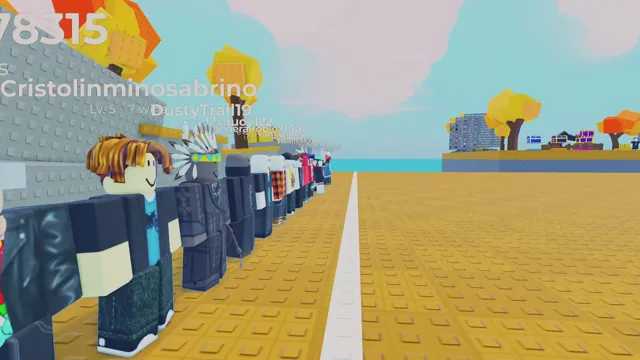
The trailer shows players beside a white line. Find the boundary and destination in your own round.
Huss Valley Official / RobloxUse the official trailer frame to get your bearings, then watch community gameplay to see a crossing unfold. Look for the boundary, your route across the field, and the players already moving into it.
Watch a round before you join one.
Follow the camera, the white crossing line, and the space between players. Pause at a change of direction, then compare the footage with the controls displayed in your own session.
YouTube connects only after you load the player or open a video link. Creator footage is a reference, not a current-version play-test by us.Sources & further reading
Public sources reviewed 11 October 2026. A publication date or an author’s test claim does not mean we independently tested it.